
Spotter XR by ReconIX · Android beta
YOUR OWN
BROADCAST
SPOTTER.
Know every player from any seat.
Point your phone at the game. Every player gets a live floating name card; tap one for stats. No face recognition, no account, two taps to set up.
- Two-tap calibration
- Live lineups & subs
- Works on any table


The problem
Who’s that?
Section 420. Names too far to read, one name at a time on the scoreboard, and the first-timer next to you disengages. The one question the ballpark can’t answer from your seat is the simplest one: who am I looking at?
- 71.75Mfans at MLB games in 2026, a fourth straight year of growth1
- 82%of them used their phone during the game2
- 35%want AR overlays with player stats in the venue2
1 AP via U.S. News, Sept 30 2026. 2 Deloitte, Sports Fan Insights, 2023.
How it works
No computer vision needed. Just a lookup.
AR tells us where the field is. The live game feed tells us who is at each position. The player standing in the shortstop zone is the shortstop, so we snap the name to the spot.

- 01
Calibrate with two taps
Tap home plate, tap second base. A virtual field snaps onto the real one and stays locked as you pan from your seat.
- 02
Live data says who is where
The game feed already knows who’s playing shortstop, who’s batting and who’s on second. Cards update on every substitution and every half inning, about every 10 seconds.
- 03
Tap a card for stats
Season line, tonight’s line, pitcher vs. batter. Replay any game play by play, or switch to a clean top-down Field view.
The AI inside
Smart where it counts. Private everywhere.
-
On-device jersey-number recognition
For Local Games, the camera reads the numbers on the field and matches them to the coach’s roster. The model runs on the phone; frames never leave it.
-
Live data fusion
Lineups, substitutions, runners and the count stream in from licensed feeds and merge with the AR field in real time. The feed says who; the field says where.
-
AR field anchoring
A two-point solve anchors a virtual field to the real one and holds it as you pan. Life-size at the park, a miniature on any table, with constant-size labels that declutter themselves.
-
Privacy by design
No face recognition, ever. Camera frames never leave the phone and nothing is recorded. Rosters for kids default to first names only, and location is optional.
Every sport
Baseball first. Every game next.
Any sport with structured positions works with the same trick. Fluid sports show exactly who’s on and pin names as the on-device vision matures.

All nine fielders, the batter and every runner, named live.
Cards swap on every substitution and every half inning. Mint for the defense, amber for the batter and runners, a score bug with the count. Replay any game this season.

Every formation slot labeled from the announced lineup.
A 4-2-3-1 is a map. Lineups land about an hour before kickoff; substitutes inherit the slot of the player they replace, and red cards clear it.

Line of scrimmage, first-down line and the line in AR.
Down, distance, ball spot and possession on the field in front of you, the quarterback and line labeled from the depth chart, and the full roster a tap away.

The exact five on the floor, every substitution.
A who’s-on strip that is never wrong, shot locations drawn on the court, and tap-to-pin: tap a player, pick the name, and the card follows them.

Who’s on the ice, every shift, power play and all.
Shifts change every 45 seconds; the strip keeps up. Strength, which end each team defends, and the number on the back matched from the lower bowl.
Local Games Founder’s favorite
Every game. Even Saturday’s.
No feed? No problem. The coach shares the roster; parents spot their kid by position or by number. No account, nothing uploaded, nothing to pay.

Coach Three steps, one time.
- Paste the rosterNames and numbers from any note or spreadsheet. First names only for minors, by default.
- Set the lineupDrag names onto the field slots: Little League, softball, 7v7 soccer and more presets.
- Share the QRShow a code or send a link. Parents open it with no account; the link is the lineup.
Parent Two steps, every game.
- ScanPoint the camera at the coach’s code. The team and lineup appear.
- Spot by position or numberHold the phone up: cards by position, or on-device number recognition finds your kid in the pack.

Tabletop mode
The game. On your table.
Not at the park? Tap two points on any flat surface and a live miniature of tonight’s field appears on it, every player named, every runner moving. Pinch to resize, twist to rotate, and drag the scrubber to replay the last three plays.
- Live, replay or offline demo
- 1×, 4× and 16× playback
- Works on a kitchen table, a desk or a tray table
The app
Built like a scoreboard.
Dark by default, mint for the defense, amber for the offense, tabular numbers everywhere. Android (ARCore) now, iOS (ARKit) next.
-
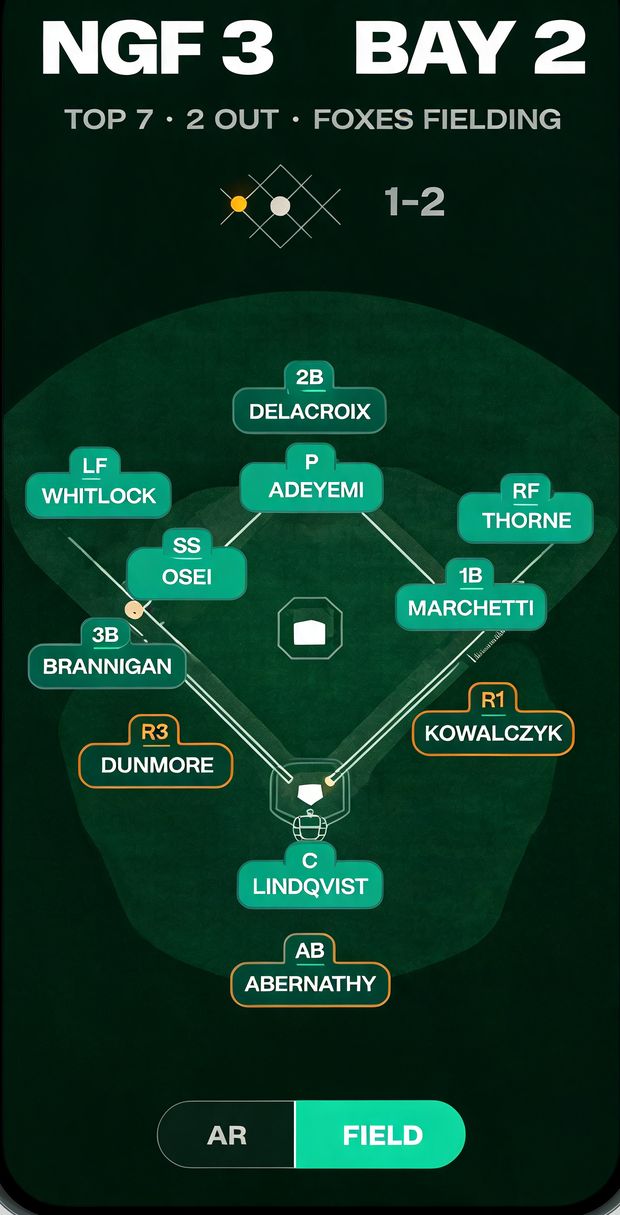
Field view
Don’t want to hold your phone up? The same names and stats on a clean top-down diamond.
-
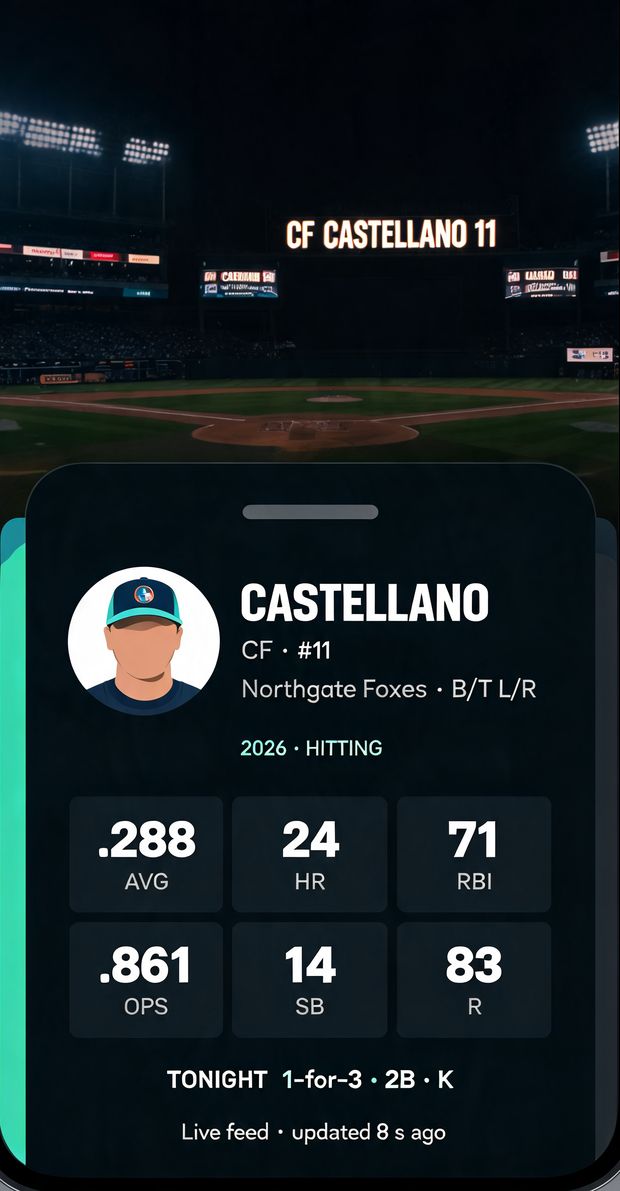
Player sheet
Tap any card: AVG, HR, RBI, OPS; ERA, WHIP, K for pitchers; tonight’s line on top.
-
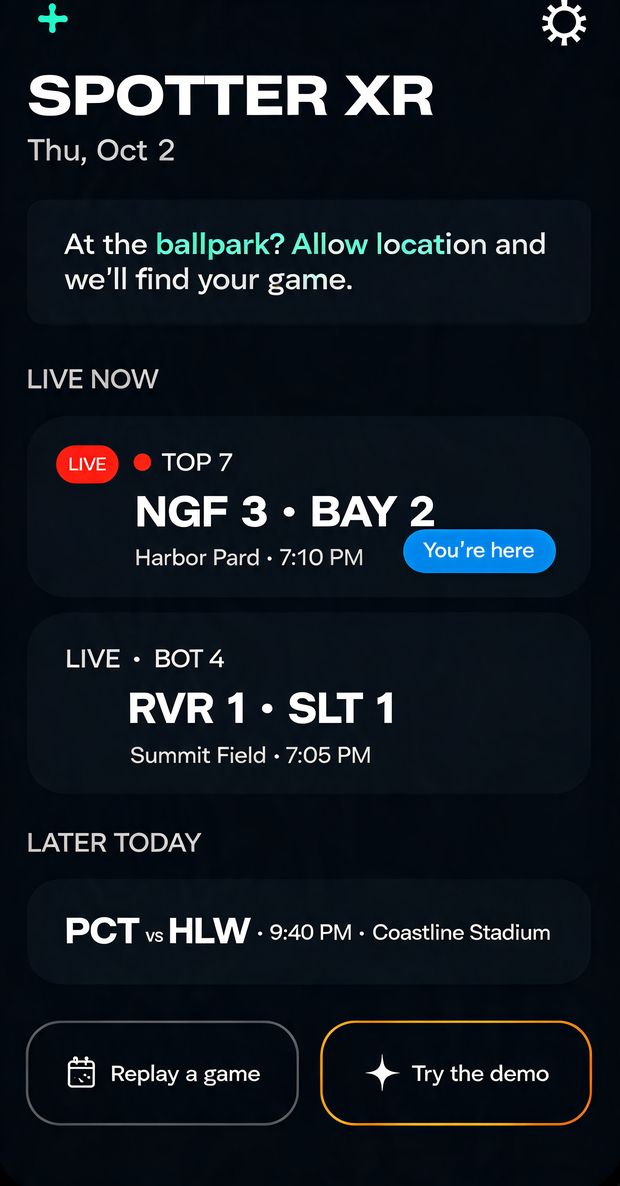
Home
Tonight’s games, one tap away. At the park, it finds your game for you.


Beta
Be the first to know every player.
Android beta first. Tell us which sport and which seat you’re in, and we’ll send one email when your invite is ready. No spam, no sharing.